My meta tags are not updating automatically.
For your meta tags to update automatically, you must configure a cron job.
If you have a dedicated server, you can likely set up a cron using the crontab function. Ask the person managing your server to handle this.
If you are on a shared server, your host likely has a cron service (sometimes called scheduled task). Contact them to see how to use it.
If neither of these two solutions works, you can use a free cron service such as: https://www.cron-job.org/en/
The URL to be entered for the cron can be found in the help tab of the module.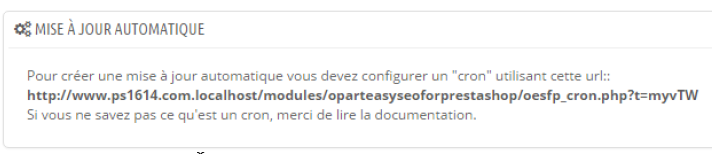
Once your cron is set up, each time it runs, the module will retrieve the list of settings allowed to be applied automatically and will thus update your meta tags.
It is up to you to determine the frequency of your cron runs so that your meta tags are as up-to-date as possible without overloading your server. Once a day is a frequency that suits most sites.
You must then wait for your cron to be launched (i.e., the time you defined has passed) for your meta tags to be updated.
If your meta tags still do not update automatically, please launch the cron URL directly in your browser.
If you see the message "no settings found", follow the instructions found here: https://faq.opart.fr/faq/694