Is it possible to manually enter shipping costs in the quote?
Yes. In the back office, you can replace carrier-calculated shipping costs with an amount entered manually.
- Create and save the quote with its customer, addresses and products.
- Open the quote and select a carrier that does not offer free shipping. Use Reload carrier list if needed.
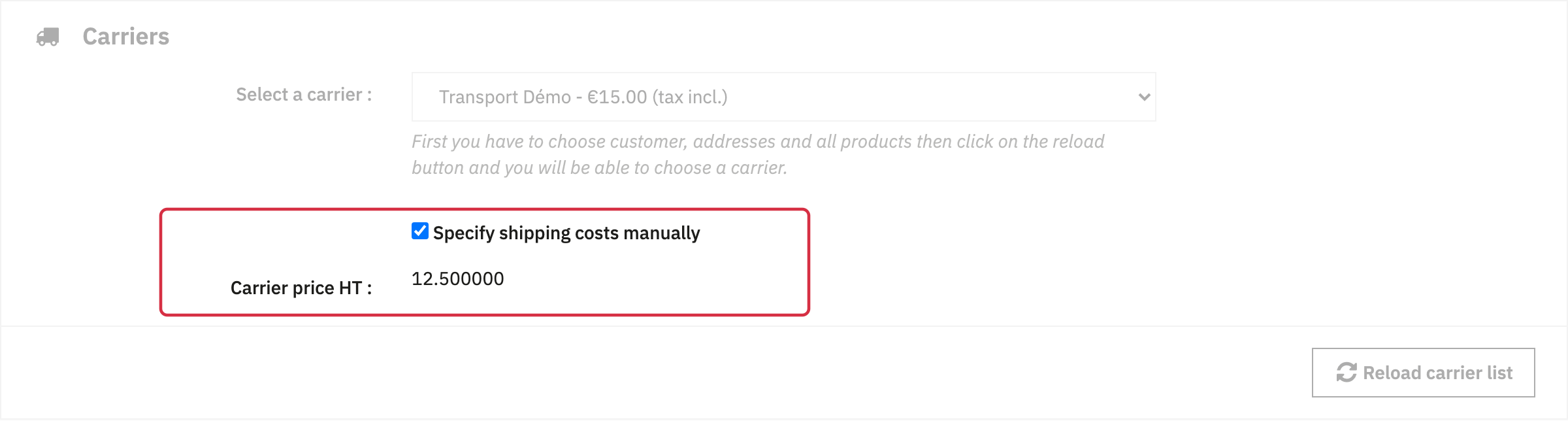
- In Carriers, select Specify shipping costs manually.
- Enter the amount excluding tax in Carrier price HT, then save the quote.
- Check shipping and taxes in the summary and PDF, then when converting to an order.
Manual entry is available for an existing quote with a non-free carrier. The selected carrier is retained, and shipping tax is calculated from that carrier.
You therefore do not need a separate “handling fee” product to replace shipping costs. For standard calculation, see the shipping amount.
Other FAQs in this category
- Is it possible to add an "add to quote" button on the product page?
- Is it possible to use the module if my store is in catalog mode?
- Can customers without an account create quotations?
- I want to use the module only to create quotes myself, can I disable it in the frontend?
- My quotes are disappearing, why?
- How to modify the sent emails
- I want my customers to be able to create quotes but not place orders, how can I do this?
- Is there a demo version of the quote module?
- Is it possible to modify the shipping amount?