I don't see all carriers, why?
The module offers the carriers available for the quotation cart. Several settings can reduce this list.
- Select the customer, their addresses and all quote products first, then click Reload carrier list.
- In Shipping > Carriers, check that the carrier is active and covers the delivery zone, customer group and cart weight or price range. For example, a carrier limited to 2 kg will not be offered for a heavier cart.
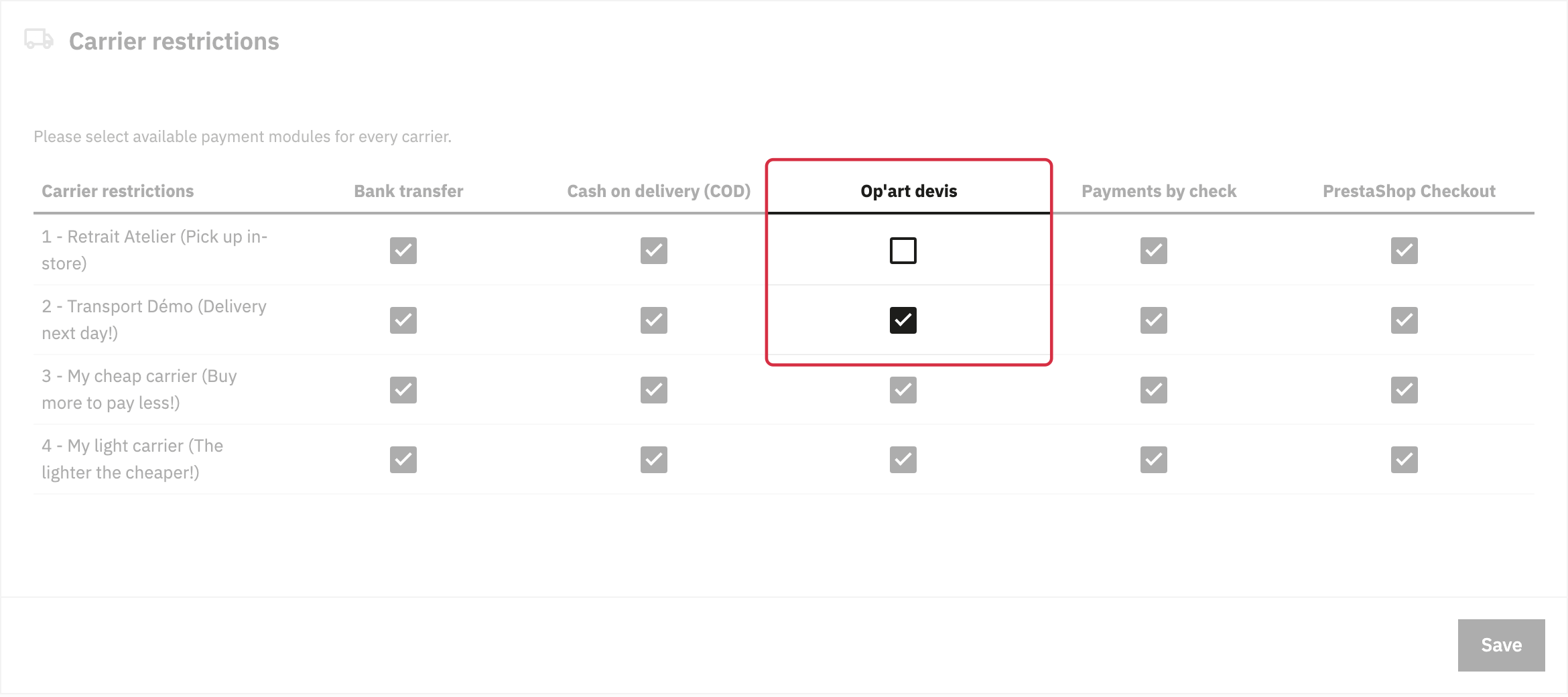
- In Payment > Preferences > Carrier restrictions, check that the carrier is enabled for the module.
In the example below, Transport Démo is enabled for the module and Retrait Atelier is not. This permission does not replace the carrier’s delivery conditions.
To enter a shipping amount agreed with the customer, see manual shipping costs. If the lists fail to load altogether, see troubleshooting back-office lists.
Other FAQs in this category
- The module's buttons do not display as I wish
- I get an error message when trying to send the quotation by email from the back office.
- Emails are not being sent
- How do I modify the quotation PDFs?
- How to translate the module texts?
- Does the quote module adapt to my shop's theme?
- Can you help me adapt the module to my shop's theme?
- How to change the quote logo?