How to translate the module texts?
To translate the module texts, follow the instructions below:
1) Go to "International / Translations"
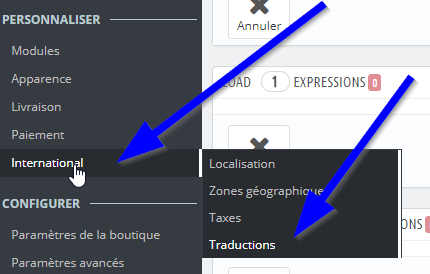
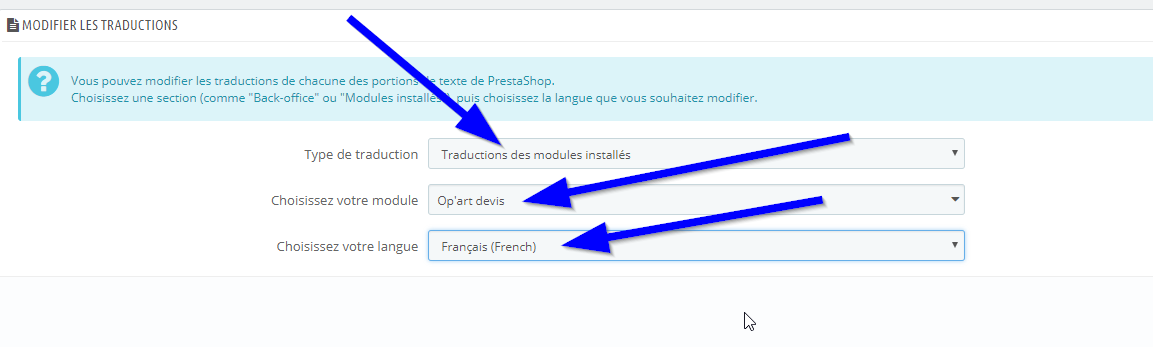
2) In the displayed form, choose:
- "Installed Modules Translations"
- "Op'art devis"
- And the language for which you want to add/modify translations.
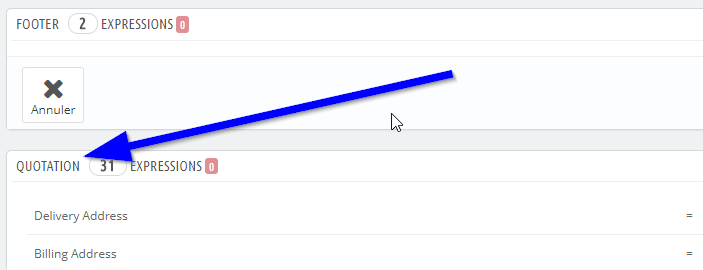
You can click on each tab to expand it and see the translatable texts.
You will find the texts used in the quote PDF in the "Quotation" tab.
Other FAQs in this category
- The module's buttons do not display as I wish
- I get an error message when trying to send the quotation by email from the back office.
- Emails are not being sent
- How do I modify the quotation PDFs?
- Does the quote module adapt to my shop's theme?
- Can you help me adapt the module to my shop's theme?
- I don't see all carriers, why?
- How to change the quote logo?