How to modify the sent emails
Here is the procedure to modify the emails sent by the module.
- Go to the "International / Translations" menu
- In the displayed form, select:
- Email Translations
- Message Body
- Core
- French
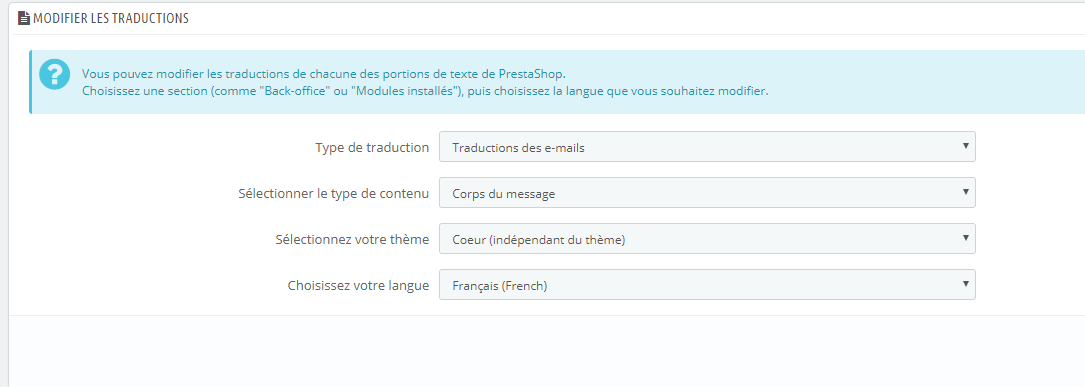
- Click on "Modify"
- Then click on "opartdevis"
- Then select the email you wish to modify.
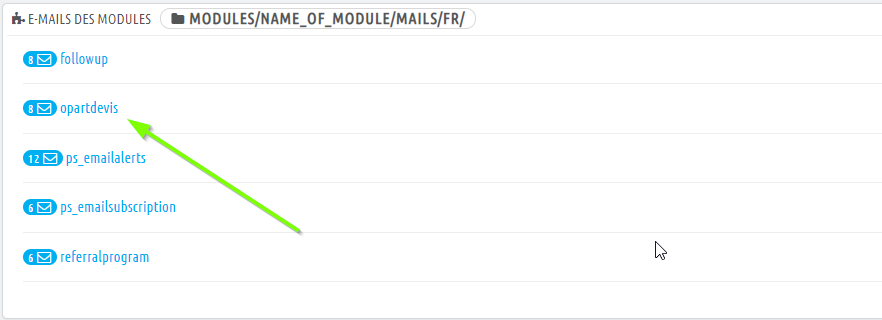
Here is what each email corresponds to:
- opartdevis_admin: The email sent to the administrator when a quote is created
- opartdevis_customer: The email sent to the customer when a quote is created
- request_quotation_admin: The email sent to the admin during a free quotation request.
- request_quotation_customer: The email sent to the customer during a free quotation request.
Other FAQs in this category
- Is it possible to manually enter shipping costs in the quote?
- Is it possible to add an "add to quote" button on the product page?
- Is it possible to use the module if my store is in catalog mode?
- Can customers without an account create quotations?
- I want to use the module only to create quotes myself, can I disable it in the frontend?
- My quotes are disappearing, why?
- I want my customers to be able to create quotes but not place orders, how can I do this?
- Is there a demo version of the quote module?
- Is it possible to modify the shipping amount?